JedIN Marketplace — 15 Packages, 6 Templates, Enterprise Connectors
A Curated Marketplace for Enterprise Integration
Building integrations from scratch is expensive. Every HTTP connection handler, every database pooling configuration, every authentication flow — these are solved problems that get re-solved on every project. Integration marketplaces exist to break this cycle, providing pre-built connectors and templates that teams can deploy and customize instead of building from zero.
JedIN's Marketplace currently offers 15 packages and 6 templates, combining official JedIN connectors with community contributions. The catalog is focused rather than bloated — every package serves a real integration use case.
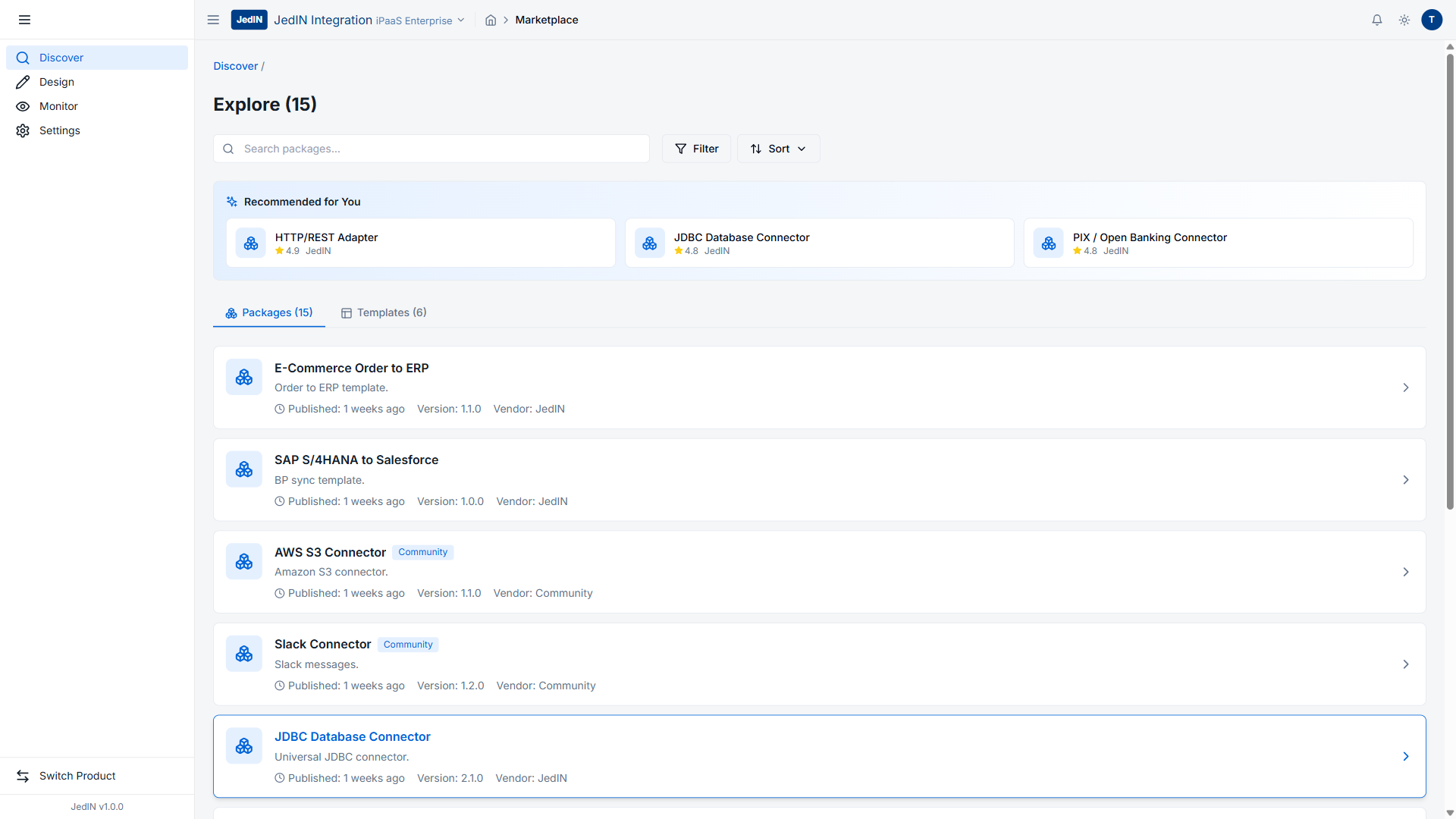
Marketplace Overview
The Marketplace interface is organized into two main tabs:
- Explore (15) — The complete catalog of available packages
- Templates (6) — Ready-to-use integration patterns that can be deployed with minimal configuration
The top of the page features a Search bar for finding specific connectors, a Filter button for narrowing results by category or vendor, and a Sort button for ordering the catalog by relevance, rating, or date.
Recommended Connectors: The Top Three
JedIN highlights three recommended connectors at the top of the Marketplace, each with community ratings:
HTTP/REST Adapter
| Field | Value |
|---|---|
| Name | HTTP/REST Adapter |
| Rating | 4.9 out of 5 |
| Vendor | JedIN |
The highest-rated connector in the marketplace. The HTTP/REST Adapter is the foundational building block for any integration that communicates over HTTP — which, in practice, means nearly every modern integration. REST APIs, webhooks, SOAP services wrapped in REST facades, GraphQL endpoints over HTTP — all of these are handled by this single adapter.
A 4.9 rating from the JedIN community reflects the maturity and reliability of this connector. HTTP integration sounds simple until you deal with retry logic, authentication schemes (OAuth2, API keys, certificates, HMAC signatures), rate limiting, timeout handling, and payload transformation. The HTTP/REST Adapter encapsulates all of this.
JDBC Database Connector
| Field | Value |
|---|---|
| Name | JDBC Database Connector |
| Rating | 4.8 out of 5 |
| Vendor | JedIN |
Database connectivity is the other universal integration requirement. The JDBC Database Connector supports any database with a JDBC driver — PostgreSQL, MySQL, Oracle, SQL Server, and more. With a 4.8 rating, it is the second-highest-rated connector in the marketplace.
For enterprise integrations, database connectors handle scenarios like:
- Polling tables for new records to trigger downstream processing
- Writing transformed data to target databases
- Executing stored procedures as part of integration flows
- Bulk data synchronization between systems
PIX/Open Banking Connector
| Field | Value |
|---|---|
| Name | PIX/Open Banking Connector |
| Rating | 4.8 out of 5 |
| Vendor | JedIN |
This connector reflects JedIN's focus on the Brazilian market. PIX is Brazil's instant payment system, launched by the Central Bank in 2020, and Open Banking is the regulatory framework for data sharing between financial institutions. Both are critical for any enterprise operating in Brazilian financial services.
The PIX/Open Banking Connector handles the specific requirements of these protocols: certificate-based authentication, specific payload formats mandated by the Central Bank, webhook handling for payment confirmations, and compliance with Open Banking API specifications. A 4.8 rating alongside a "JedIN" vendor label means this is an officially maintained connector with production-grade support.
This is a differentiator. Global iPaaS platforms like MuleSoft and Dell Boomi offer hundreds of connectors, but PIX and Open Banking support typically requires custom development. JedIN provides it out of the box.
The Package Catalog
Below the recommended section, the full package catalog lists all 15 available packages. Here is what is visible in the marketplace:
Enterprise Integration Packages
| Package | Version | Vendor | Type |
|---|---|---|---|
| E-Commerce Order to ERP | v1.1.0 | JedIN | Official |
| SAP S/4HANA to Salesforce | v1.0.0 | JedIN | Official |
| JDBC Database Connector | v2.1.0 | JedIN | Official |
E-Commerce Order to ERP (v1.1.0) is a complete integration pattern for the most common e-commerce scenario: receiving orders from a storefront and pushing them into an ERP system for fulfillment. The v1.1.0 version indicates this package has already been through at least one iteration based on real-world usage. As a JedIN-official package, it follows the platform's design standards and is supported by the JedIN team.
SAP S/4HANA to Salesforce (v1.0.0) bridges two of the most widely deployed enterprise systems in the world. SAP S/4HANA handles ERP operations while Salesforce manages CRM. Data needs to flow between them — customer master data, pricing, order status, and more. This package provides the integration scaffolding that enterprises typically spend weeks or months building from scratch.
JDBC Database Connector (v2.1.0) appears both in the recommended section and the catalog, at version 2.1.0. The version number indicates significant maturity — this connector has gone through two major versions and one minor update.
Community-Contributed Packages
| Package | Version | Vendor | Type |
|---|---|---|---|
| AWS S3 Connector | v1.1.0 | Community | Community |
| Slack Connector | v1.2.0 | Community | Community |
AWS S3 Connector (v1.1.0) handles file-based integrations with Amazon's object storage service. Upload, download, list, and manage S3 objects as part of integration flows. Common use cases include processing uploaded files (invoices, orders, reports) and archiving integration payloads.
Slack Connector (v1.2.0) enables integration flows to send notifications, alerts, and reports to Slack channels. When an integration fails, a critical order arrives, or a batch job completes, the Slack Connector pushes a message to the relevant team channel. At v1.2.0, this community connector has seen active development.
The Community vendor label distinguishes these from official JedIN packages. Community connectors are contributed by JedIN users and undergo a review process before appearing in the marketplace, but they are maintained by their contributors rather than the JedIN team.
The Two-Vendor Model
JedIN's marketplace uses a clear two-tier vendor model:
| Vendor | What It Means |
|---|---|
| JedIN | Official connectors built and maintained by the JedIN team. Guaranteed compatibility, regular updates, and production support. |
| Community | Contributed by JedIN users. Reviewed for quality and security, but maintained by the community. |
This model balances quality control with ecosystem growth. Official connectors cover the most critical use cases (HTTP, JDBC, PIX, SAP, Salesforce), while community connectors fill niche needs (specific cloud services, notification tools) without burdening the core team.
Templates: 6 Ready-to-Deploy Patterns
The Templates (6) tab provides pre-configured integration patterns that go beyond individual connectors. While a connector handles communication with a specific system, a template provides an end-to-end integration flow that combines multiple connectors with transformation logic, error handling, and routing.
Six templates in the marketplace means six common integration patterns that teams can deploy immediately and customize to their specific requirements. The templates tab is accessible from the same marketplace interface, one click away from the Explore view.
Templates significantly reduce time-to-value. Instead of designing an integration flow from scratch, selecting nodes, configuring connections, and defining transformations, a template provides a working starting point. The team reviews the template, adjusts configurations (endpoints, credentials, field mappings), and deploys.
Marketplace in the Integration Lifecycle
The marketplace fits into JedIN's broader integration lifecycle as the starting point:
- Discover (Marketplace): Find connectors and templates that match the integration requirement
- Design: Customize the selected package or template in the visual flow designer
- Deploy: Push the configured flow to the runtime
- Monitor: Track execution, message counts, and success rates
This lifecycle is reflected in JedIN's sidebar navigation: Discover, Design, Monitor, and Settings. The Marketplace lives under Discover, connecting directly to the Design workspace where packages become editable integration flows.
Practical Impact: What 15 Packages Mean
Fifteen packages might seem modest compared to marketplaces that advertise hundreds or thousands of connectors. But the distinction matters:
Every package is functional. There are no placeholder entries, no "coming soon" badges, no connectors that work in demos but fail in production. The ratings (4.8 and 4.9) reflect real usage feedback.
The selection is strategic. HTTP/REST covers 80% of modern API integrations. JDBC covers database connectivity. PIX/Open Banking covers Brazilian financial services. SAP S/4HANA and Salesforce cover the two most common enterprise systems. E-Commerce Order to ERP covers the most common integration pattern. AWS S3 and Slack cover cloud infrastructure and team communication.
Community growth is organic. The two community packages (AWS S3 and Slack) demonstrate that the community contribution model works. As JedIN's user base grows, this catalog will expand from community contributions without requiring the JedIN team to build every connector.
Key Numbers from the Marketplace
| Metric | Value |
|---|---|
| Total packages | 15 |
| Templates available | 6 |
| Highest-rated connector | HTTP/REST Adapter (4.9) |
| Official (JedIN) packages | Multiple (HTTP, JDBC, PIX, E-Commerce, SAP-Salesforce) |
| Community packages | 2 visible (AWS S3, Slack) |
| Connector versions | Range from v1.0.0 to v2.1.0 |
Every number and package name in this article comes directly from the JedIN Marketplace screenshot. The platform is available for evaluation, and the marketplace is accessible from the Discover section of any JedIN instance.
Related Articles
JedIN Marketplace Guide: Browsing and Installing Connectors
A step-by-step guide to navigating the JedIN Marketplace — discovering connectors, browsing templates, and installing packages for your integration projects.
JedIN Integration — Complete iPaaS Core Technology Stack
Technical deep dive into the core product of the JedIN platform: Next.js 14, NestJS 10, Prisma 5, Apache Camel K 2.9 + Quarkus + Java 21, KEDA auto-scaling, PostgreSQL 16 with multi-tenant RLS, Redis 7, MinIO, BullMQ, 30 MCPs and 307 tools.
JedIN Real-Time Monitoring — 1655 Messages, 92 Runtime Artifacts
Inside JedIN's monitoring dashboard: 1655 messages processed in 30 days, 92 runtime artifacts tracked, real-time execution visibility with sub-second refresh.