JedIN Integration Design — 101 Packages Managing Enterprise Flows
<video controls width="100%" style={{borderRadius: '8px', marginBottom: '1.5rem'}}> <source src="/blog/videos/jedin-flow-designer-tour.mp4" type="video/mp4" /> Your browser does not support the video tag. </video>
Enterprise Integration at Scale: 101 Packages and Counting
Integration platforms live or die by their ability to organize complexity. When an enterprise runs dozens of business processes across SAP, CRM systems, e-commerce platforms, and internal services, the sheer volume of integration artifacts can become unmanageable. Scattered scripts, undocumented flows, and orphaned configurations turn what should be a strategic asset into operational debt.
JedIN's Design workspace tackles this problem head-on. With 101 active integration packages currently deployed in a real environment, the platform demonstrates that large-scale integration management does not have to mean large-scale chaos.
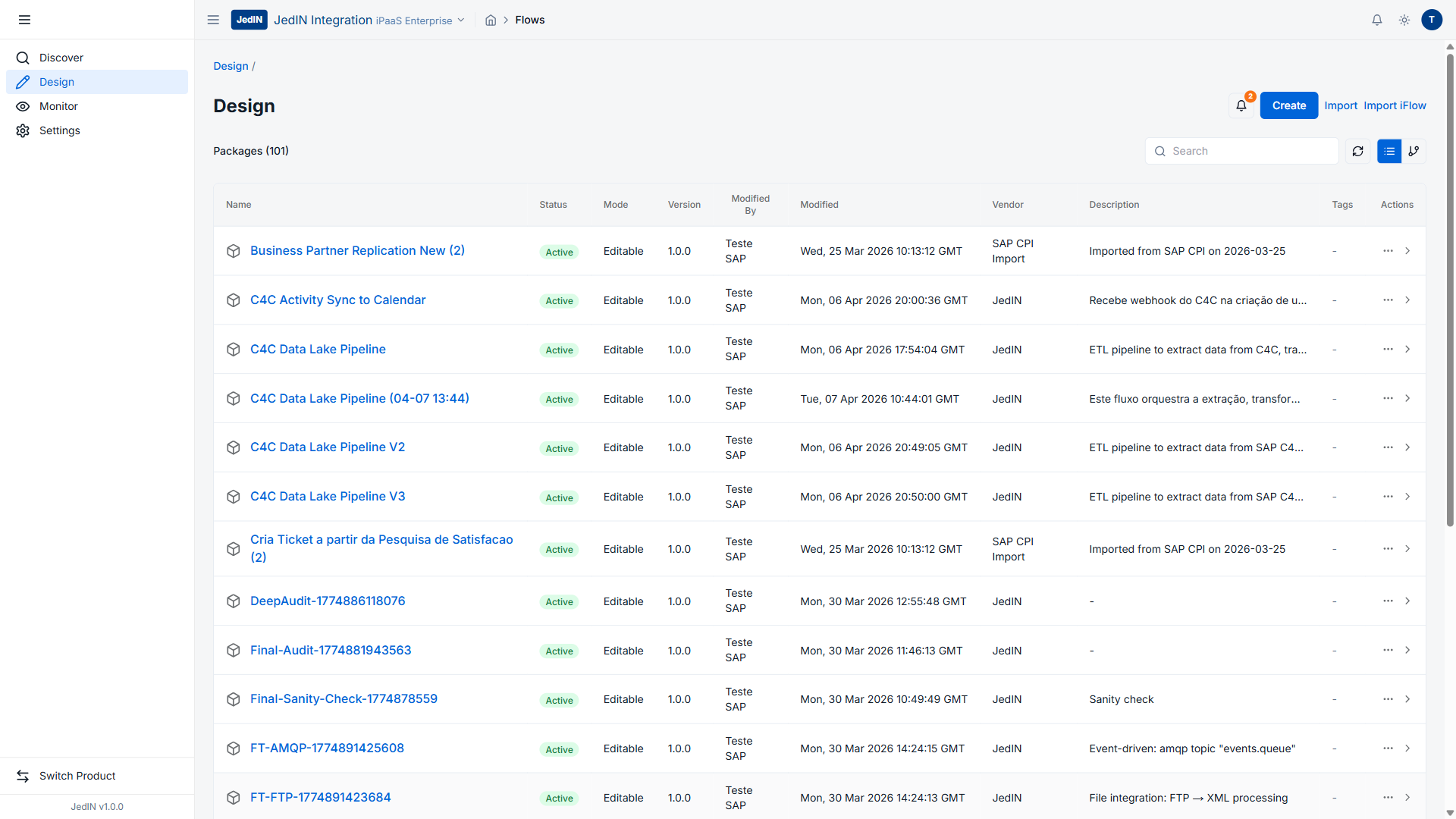
What the Design Workspace Looks Like
The Design view is the primary workspace where integration architects and developers create, organize, and maintain their integration content. The screenshot above captures a production-grade environment with the following verified data:
- 101 packages total, all in Active status
- Every package in Editable mode, meaning they are ready for modification
- All packages at Version 1.0.0, establishing a consistent baseline
- The sidebar navigation shows four main areas: Discover, Design (currently active), Monitor, and Settings
- The header reads "JedIN Integration iPaaS Enterprise", confirming the enterprise tier
The toolbar at the top of the package list provides four primary actions: Create (new package from scratch), Import (bulk import), Import iFlow (SAP CPI-compatible import), and a Search bar for filtering across the full package catalog.
The Packages: Real Enterprise Content
These are not demo packages. The list contains real integration content spanning multiple business domains. Here is what the package catalog reveals:
SAP CPI Migrations
Several packages carry the vendor label "SAP CPI Import" with descriptions reading "Imported from SAP CPI on 2026-03-25". This represents a real migration scenario where existing SAP Cloud Platform Integration content was brought into JedIN without rebuilding from scratch. The Import iFlow feature enables this migration path, allowing enterprises to preserve their investment in existing SAP CPI artifacts while gaining the benefits of JedIN's modern interface and enhanced capabilities.
Specific SAP CPI-origin packages visible in the list include:
- Business Partner Replication New (appearing twice, indicating versioned iterations)
- FT-AMQP — an AMQP-based integration flow
- FT-FTP — FTP file transfer integration
CRM and Customer Data Pipelines
The C4C (SAP Cloud for Customer) packages demonstrate sophisticated data movement patterns:
- C4C Activity Sync to Calendar — synchronizing CRM activities with calendar systems
- C4C Data Lake Pipeline — appearing in multiple versions, this package handles ETL (Extract, Transform, Load) operations. The description confirms: "ETL pipeline to extract data from C4C"
These packages illustrate a common enterprise pattern: CRM data needs to flow to analytics platforms, data warehouses, and downstream systems. Rather than building point-to-point connections, JedIN packages encapsulate the entire pipeline logic.
Customer Experience Automation
One package stands out for its business-level naming: "Cria Ticket a partir da Pesquisa de Satisfacao" (Create Ticket from Satisfaction Survey). This package, appearing twice in the list, automates a critical customer experience workflow — when a satisfaction survey yields negative results, the system automatically creates a support ticket. The truncated description reads "Recebe webhook do C4C na criacao de u...", confirming it receives webhook events from SAP C4C to trigger the ticket creation process.
Quality Assurance and Audit Packages
Several packages serve operational governance purposes:
- DeepAudit — deep inspection of integration configurations
- Final-Audit — comprehensive audit validation
- Final-Sanity-Check — pre-deployment verification
These packages reflect a mature integration practice where automated quality checks are themselves managed as integration flows. This is a pattern borrowed from CI/CD pipelines applied to the integration domain.
Vendor and Ownership Model
The Vendor column in the package list shows three distinct sources:
| Vendor | Meaning |
|---|---|
| Teste SAP | Packages created or modified during SAP testing cycles |
| JedIN | Native JedIN packages built on the platform |
| SAP CPI Import | Packages migrated from SAP Cloud Platform Integration |
The Modified By column shows "Teste SAP" as the active modifier, indicating an SAP integration specialist working across the package catalog. This multi-vendor attribution model matters in enterprise settings where different teams, partners, and vendors contribute integration content to the same platform.
Why 101 Packages Matters
The number itself tells a story. One hundred and one packages means this is not a proof of concept. It is a working environment where:
-
Migration is real. SAP CPI content has been imported and is being actively managed alongside native JedIN packages. The platform does not force an all-or-nothing adoption.
-
Organization scales. With search, filtering, and consistent versioning (all at Version 1.0.0), finding and managing specific packages remains practical even as the catalog grows.
-
Multiple domains coexist. CRM synchronization, file transfer, data lake pipelines, customer experience automation, and audit workflows all live in the same workspace without stepping on each other.
-
Governance is built in. The Active/Editable status model, version tracking, and vendor attribution provide the audit trail that enterprise compliance teams require.
The Design Workflow
Working within the Design workspace follows a structured pattern:
Package Creation: Click Create to start a new package with a name, description, and vendor. The package becomes the container for one or more integration flows (artifacts).
SAP CPI Import: Click Import iFlow to bring in existing SAP CPI integration flows. JedIN parses the SAP CPI format and creates corresponding packages with full fidelity — nodes, edges, configurations, and properties are all preserved.
Bulk Import: The Import button supports bulk operations for migrating large catalogs.
Search and Filter: With 101 packages, the search bar becomes essential. Type any keyword — a package name, vendor, or description fragment — and the list filters in real time.
Each package in the list is clickable, opening into the artifact view where individual integration flows can be edited using JedIN's visual flow designer. The flow designer supports the same node types and configurations as SAP CPI, plus JedIN-native extensions.
Architecture Behind the Package Model
JedIN's package model draws from established integration platform patterns while adding modern capabilities:
- Package: A logical grouping of related integration artifacts. Think of it as a project folder with metadata, versioning, and access control.
- Artifact: An individual integration flow within a package. Each artifact has its own visual design, configuration, and deployment lifecycle.
- Version: Semantic versioning (currently all at 1.0.0) enables rollback and audit capabilities.
- Status: Active/Inactive controls visibility; Editable/Read-Only controls modification rights.
This hierarchy means an enterprise can organize integration content by business domain (all CRM integrations in one package), by project (all flows for a specific initiative), or by team (each team owns their packages).
From Design to Execution
The 101 packages in Design are one side of the story. The other side is what happens when these packages are deployed. JedIN's Monitor workspace (visible in the sidebar) tracks execution in real time — message counts, success rates, and runtime status for every deployed flow.
The connection between Design and Monitor is direct: any package in the Design workspace can be deployed with a single action, and its execution immediately appears in the monitoring dashboard. This tight feedback loop between design-time and runtime is what separates a production-grade iPaaS from a development tool.
Key Takeaways
The JedIN Design workspace with 101 active packages demonstrates several capabilities that matter for enterprise adoption:
- SAP CPI compatibility is not theoretical — real packages have been imported and are actively managed
- Scale is practical — 101 packages with consistent search, versioning, and status management
- Multi-vendor support tracks who created and modified each package
- The Editable/Active model provides governance without friction
- Four action buttons (Create, Import, Import iFlow, Search) cover the full lifecycle from creation through migration to discovery
For enterprises evaluating integration platforms, the question is rarely "can it handle 5 flows?" The question is "can it handle 500?" With 101 packages already organized and manageable in a single workspace, JedIN's Design view answers that question convincingly.
Related Articles
JedIN Integration — Complete iPaaS Core Technology Stack
Technical deep dive into the core product of the JedIN platform: Next.js 14, NestJS 10, Prisma 5, Apache Camel K 2.9 + Quarkus + Java 21, KEDA auto-scaling, PostgreSQL 16 with multi-tenant RLS, Redis 7, MinIO, BullMQ, 30 MCPs and 307 tools.
JedIN Real-Time Monitoring — 1655 Messages, 92 Runtime Artifacts
Inside JedIN's monitoring dashboard: 1655 messages processed in 30 days, 92 runtime artifacts tracked, real-time execution visibility with sub-second refresh.
JedIN Marketplace — 15 Packages, 6 Templates, Enterprise Connectors
Exploring JedIN's integration marketplace with 15 curated packages, 6 ready-to-use templates, and highly-rated connectors for REST, JDBC, and PIX/Open Banking.